Every client's tax returns, straight to Digipoort.
You file VAT, ICP, income tax, corporate tax and payroll tax returns from Taxmo, and file the annual accounts with the KvK. Per client you see what is ready, what your client still has to approve and what the Belastingdienst has accepted. No separate filing or payroll package next to it.
Your first 2 clients are free. No credit card needed.
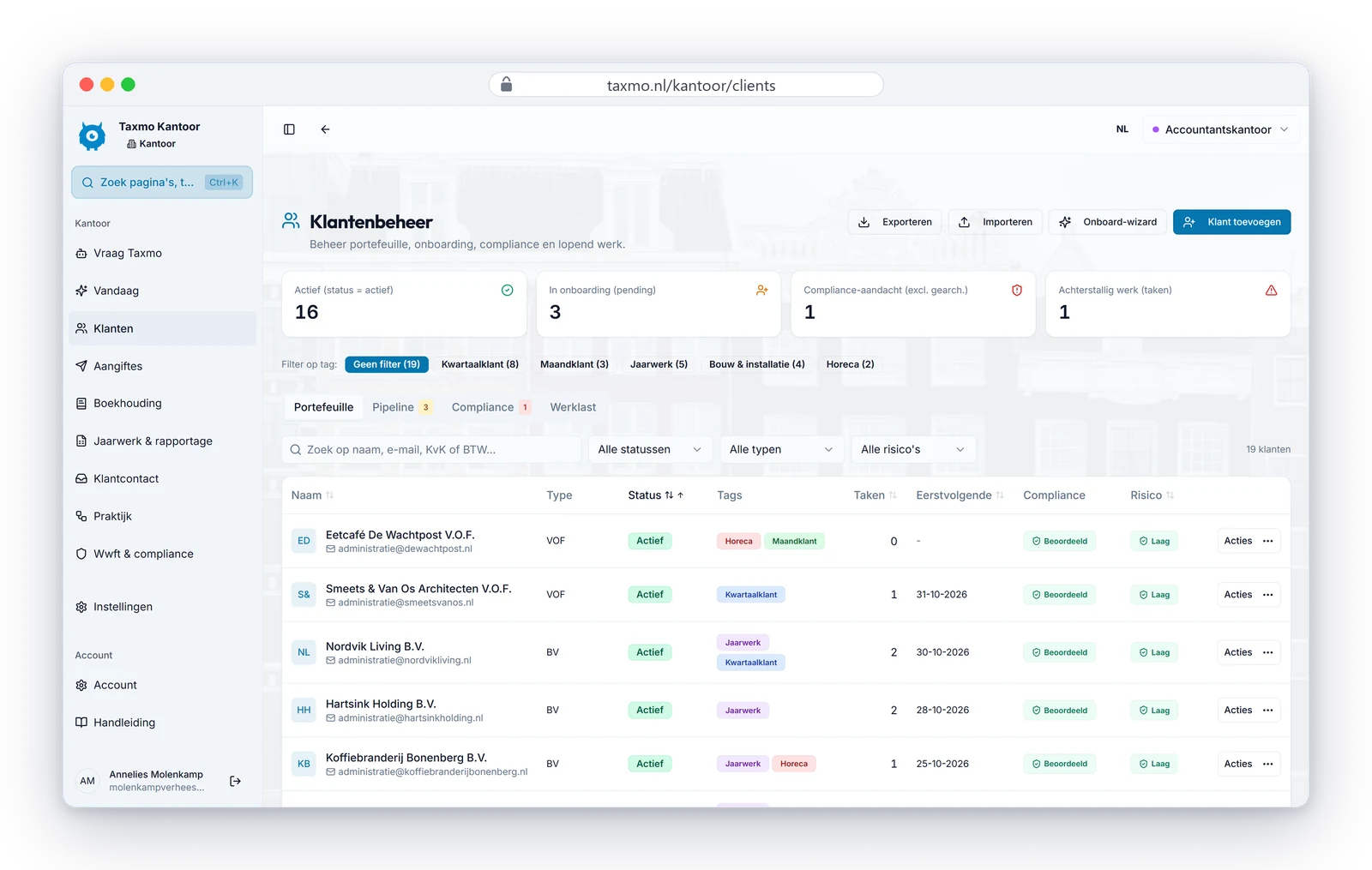
All your clients on one screen
Per client you see the status, the open tasks, the next deadline and whether compliance is in order. Filter by tag, or search by name, email, KvK or VAT number.
What you do with it every day
Bookkeeping for your clients
Bank lines and receipts from all your clients arrive in one place and are booked with a suggestion.
- Bank lines via the bank connection or an import, receipts via your client's portal.
- The work queue shows the open bank lines of all your clients, with a suggested booking per line.
- If the suggestion is right, you approve it. If in doubt, you ask your client a question about that line.
Filings via Digipoort
You prepare and file VAT, ICP, income tax, corporate tax and payroll tax returns from Taxmo, with Taxmo's certificate.
- The return comes out of your client's books; you check the figures before you file.
- If you want approval first, you send the return for approval and your client approves it in the app.
- After filing you see on the client whether the Belastingdienst has received and accepted the return.
Annual accounts and filing with the KvK
From trial balance to filing, with the compilation report and the file alongside.
- You take the trial balance from your client's books, or you upload it.
- Taxmo produces the annual accounts as a PDF and as an SBR file, for micro, small, medium-sized and large companies.
- You file with the KvK via Digipoort. After acceptance, that client's file is locked.
Client management
All your clients in one list, with per client the status, open tasks and the next deadline.
- You add a client with name, email address and KvK number, or you import your client list in one go.
- If you only file the return or the annual accounts for a client, you set them to 'filing only': that client falls outside the per-client amount.
- Filter by tag, or search by name, email, KvK or VAT number.
Client portal under your own name
Your client works in a portal with your logo and colour.
- You invite your client, or you keep the books yourself and hand them over later.
- Document requests, questions about bank lines and approvals of returns sit together for your client.
- On the Waiting for client board you see what is still open, and sending a reminder is one click.
Import and export
Data goes in without retyping and comes out again in common formats.
- Import: chart of accounts, opening balance, general ledger and contacts as CSV, or an XAF audit file for the income and expenses. You see a trial import first.
- Export: your client list and the trial balance per client as CSV, and the audit log per client as a PDF.
- With an API key for your firm you fetch your clients and the status of their filings into your own systems.
What you file from Taxmo Kantoor
- VAT return (BTW-aangifte) (Available): Monthly or quarterly, for 2026 periods. If you want your client's approval first, they give it in the app.
- EC Sales List (ICP-opgaaf) (Available): Monthly or quarterly, including ABC (triangular) supplies.
- Income tax return (IB) (Available): For entrepreneurs with business profit, tax years 2024 and 2025.
- Corporate tax return (VPB) (Available): With the tax balance sheet and profit and loss account, tax years 2023 to 2025. Also for clients you only file for.
- Payroll tax return (loonaangifte) (Available): Monthly or per four weeks, for salaries paid per month, per four weeks or per week. Payroll year 2026.
- Annual accounts at the KvK (Available): Filed via SBR for micro, small, medium-sized and large companies.
- VAT correction (suppletie) and objection (Available): You file a VAT correction (suppletie OB) and an objection to an assessment via Digipoort, with the file and the deadlines together.
Taxmo files with its own PKIoverheid certificate, so you do not need a certificate of your own.
From intake to filing
- Add a client: Name, email address and KvK number. Invite your client to the portal, or keep the books yourself without the client logging in.
- Bring in the data: Bank lines via the bank connection or an import, receipts via the portal. Whatever is still missing you request, and Taxmo reminds your client by email.
- Book and check: The work queue shows the open bank lines of all your clients on one screen, with a suggestion per line. If it is right, you approve them in one go.
- Approve and file: You send the return to your client for approval, file via Digipoort and see the Belastingdienst status back on the client.
What else is included
Payroll with the payroll tax return
You run payroll in the same package as the bookkeeping and the return.
- Wage tax calculated with the official 2026 tables of the Belastingdienst
- Payslips as PDF, as a zip or by email to the employee
- SEPA file for the net wages and the payroll journal in your client's books
- Pension, sick pay and company car in the run, with a WKR overview and a minimum wage check
- Collective agreement (cao) profiles with wage scales, as many as you need, and the cao code checked against the Belastingdienst list
Work queue across all your clients
Every bank line that still needs booking, from all your clients on one screen. Taxmo suggests a booking per line; you approve, adjust or ask your client a question.
Client portal under your own name
Your client sees your logo and colour. Document requests, questions about bank lines and approvals of returns sit together on the Waiting for client board, and sending a reminder is one click.
Wwft file per client
Risk classification low, medium or high with a default review term of 24, 12 or 6 months, a SIRA matrix for your firm, UBOs and PEP status you record per client, and a draft goAML report for the FIU-NL that you submit yourself. Automatic screening against sanctions lists and news is not in it yet.
Compilation and year-end work
Compilation reports under NBA Standard 4410 (standard, limited and extended) as templates, a permanent and a current file per client that you lock when the work is done, and the annual accounts you file with the KvK. Your firm reviews and signs.
Taxmo AI as an assistant
Looks into a tax question with references to the law, drafts a reply to a client message or a Wwft risk memo, and checks a file before it is locked. Everything Taxmo AI produces is a draft: you check it and you are responsible for the outcome.
Switching to Taxmo
You do not have to start over. What can come in today:
- Chart of accounts, opening balance, general ledger and contacts as a CSV file from your current package.
- Or an XML Audit File Financial (XAF 3 or 4.0) for the income and expenses of the current year.
- Every import shows as a trial first: what will be booked, with the lines that do not fit. After that you can still reverse an import batch as a whole, as long as the period is not locked.
- You import your client list as a CSV export from Twinfield, Exact, Yuki or Moneybird. Taxmo recognises the format and maps the columns.
Where your clients' data is stored
- Data in Frankfurt: Servers, database and uploaded files are hosted by AWS and Neon in Frankfurt, with a standby server in Ireland.
- Encrypted: Traffic always goes over TLS. BSNs are stored encrypted on top of that (AES-256), as are the IBAN in the business profile and the tokens of bank connections.
- 7-year audit log: Who did what and when goes into an append-only audit log. Those entries are kept for 7 years (AWR art. 52), and per client you export them as a PDF.
- Roles and sign-in: Owner, employee, trainee and external staff, each with their own rights. You can make two-step verification and an IP allowlist mandatory for the whole firm.
Price per client, cheaper as you grow
- First 2 clients: free
- Client 3 to 25: €9.95 per client per month, excl. VAT
- Client 26 to 75: €7.95 per client per month, excl. VAT
- Client 76 and up: €5.95 per client per month, excl. VAT
A client with their own paid Taxmo subscription is free for the firm.
5 clients: €29.85 per month. 10 clients: €79.60 per month. 20 clients: €179.10 per month. 50 clients: €427.60 per month.
A firm with 30 clients, 4 of whom pay for their own Taxmo subscription. Those 4 cost the firm nothing, so 26 clients count: 2 clients free, 23 x €9.95 = €228.85, 1 x €7.95 = €7.95. Total €236.80 per month, excl. VAT.
Clients for whom you only file the corporate or income tax return, without their bookkeeping, fall outside the per-client amount. Each return costs one prepaid filing credit: corporate tax return EUR 25, income tax return EUR 15, 20 filing credits EUR 99, 100 filing credits EUR 399, unlimited for 12 months EUR 499, all excl. VAT. Credits do not expire.
All amounts excl. VAT. Fair-use limits apply per client, and filing credits apply to clients you only file for.
Only need the Wwft client file, without bookkeeping and filings? See Taxmo Schild (Dutch)
Questions firms ask
What does Taxmo Kantoor cost?
You pay per client per month, excl. VAT: free for the first 2, €9.95 from client 3, €7.95 from client 26, €5.95 from client 76. A client with their own paid Taxmo subscription costs you nothing. There is no activation fee and no surcharge per booking; every feature is included.
Do I need my own certificate or Becon number?
No. Taxmo files the returns via Digipoort with Taxmo's own PKIoverheid certificate. If you do have a Becon number, you can include it with the corporate tax return.
How do I switch from my current package?
Per client you import the chart of accounts, opening balance, general ledger and contacts as CSV, or the income and expenses from an XAF audit file. You see a trial import first, and an import batch can be reversed as a whole. Your client list is imported in one go.
Is there a limit on the number of collective agreements (cao's) in payroll?
No. You create as many cao profiles as you need and link each employee to a profile and a scale. A profile records what the agreement sets, such as holiday allowance, sick pay and the wage scales per start date. Taxmo checks the cao code of a profile against the Caolijst of the Belastingdienst. Nothing changes for an employee until you confirm it, and the payroll run warns you when a wage is below the scale. A profile does not calculate step increases, year-end payments or sector fund contributions automatically.
Which banks can I connect?
Among others ABN AMRO, ING, Rabobank, bunq, Revolut, Wise and SNS. The connection runs over PSD2: your client gives consent at their own bank, and that consent has to be renewed after a few months. No connection? Then MT940 or CAMT.053 files from online banking can be imported.
What if a filed VAT return is wrong?
After filing, the bookings in that period can no longer be changed. You book a correction in an open period, for example with a credit note. If a VAT correction (suppletie) is needed, you file it from Taxmo via Digipoort.
Where is my clients' data stored?
With AWS and Neon in Frankfurt, with a standby server in Ireland. BSNs, the IBAN in the business profile and the tokens of bank connections are additionally encrypted. Questions about the GDPR or a data processing agreement? Email privacy@taxmo.nl.
Can my client look along or book themselves?
Yes, if you want. You invite your client to the portal, or you keep the books yourself and hand them over later. Your client approves a return in the app before you file it.
Is Taxmo RGS Ready?
Yes. Taxmo has been on GBNED's RGS Ready list on softwarepakketten.nl since September 2026, based on a self-assessment reviewed by GBNED. In practice: the complete current RGS chart, an RGS code on every ledger account with suggestions for custom accounts, XAF 4.0 export with RGS codes and RGS codes in the REST API.
Taxmo is on GBNED's RGS Ready list: up-to-date RGS chart, automatic mapping of ledger accounts and XAF 4.0 export with RGS codes. See the listing
Questions? Call +31 20 308 60 26.